Showing posts with label programming. Show all posts

Wednesday, April 5, 2023

They say the best way to learn is by doing, but sometimes the best way is to automate!

Ah, the version control system git. We've all been there, typing out commands to push a new commit to the server, trying to remember which is which. For example to update the remote repository with your local changes, I use the git pull, add, commit and push commands in sequence. This will ensure that the remote repository is up-to-date with the local repository. Well, I had enough of it. I decided to take matters into my own hands and wrote a script that I named 'gits'. It's just a one-liner that does the steps of git pull, git add, git commit and git push for me, without all the hassle of having to type each paticular command. The commit message is given as argument to gits, if I forget about it, the script puts the number of changed files there as a placeholder.

@echo off
:: Batch script to commit and push your git changes
:: and quickly resolve conflicts
::
:: by Wil
:: March 2023 V0.21
::
:: The script has the decency to ask before adding new files
:: If an argument is given, this is used as the commit message
:: otherwise a generic commit message is generated

setlocal ENABLEDELAYEDEXPANSION

for /F "delims=#" %%E in ('"prompt #$E# & for %%E in (1) do rem "') do set "ESCchar=%%E"
set "red=%ESCchar%[91m"
set "green=%ESCchar%[92m"
set "yellow=%ESCchar%[93m"
set "magenta=%ESCchar%[95m"
set "cyan=%ESCchar%[96m"
set "white=%ESCchar%[97m"
set "black=%ESCchar%[30m"
set "nocolor=%ESCchar%[0m"
set "bold=%ESCchar%[1m"

::stage modifications and deletions
set countmodified=0
for /f %%C in ('git ls-files -m') do set /A countmodified=!countmodified!+1

if NOT "!countmodified!"=="0" (
  git add -u
)

set /A total=!countmodified!

for /f %%C in ('git diff --cached --numstat') do set /A total=!total!+1

::check if there are untracked (new) files
set countnew=0
for /f %%C in ('git ls-files . --exclude-standard --others') do set /A countnew=!countnew!+1

if NOT "!countnew!"=="0" (
  git ls-files . --exclude-standard --others
  echo.
  echo There are !countnew! files, should they be added?
  CHOICE /C asx /M "Press [A] for adding the files, [S] for skipping without and [X] for exiting this script."
  IF !ERRORLEVEL! EQU 3 (
    exit /b
  )
  IF !ERRORLEVEL! EQU 1 (
    git add .
    set /A total=!total!+!countnew!
  )
)

if "!total!"=="0" (
  echo Nothing to do!
) else (
  if "%1"=="" (
    git commit -m "updated !total! files"
  ) else (
    git commit -m "%*"
  )
  git pull
  git push

  set conflicts=0
  set unsolved=0
  for /f %%C in ('git ls-files -u  ^| cut -f 2  ^| sort ^|uniq') do (
    set cff=%%C
    call :SUBCHOICE
    IF !ERRORLEVEL! EQU 2 (
      git checkout --theirs !cff!
      git add !cff!
    ) ELSE IF !ERRORLEVEL! EQU 3 (
      git checkout --ours !cff!
      git add !cff!
    ) ELSE IF !ERRORLEVEL! EQU 4 (
      set /A unsolved=!unsolved!+1
    ) ELSE IF !ERRORLEVEL! EQU 5 (
      exit /b
    )
    set /A conflicts=!conflicts!+1
  )

  if !unsolved! GTR 0 (
    echo There are still %red%!conflicts! files%nocolor% in conflict.
    exit /b
  )
 
  if !conflicts! GTR 0 (
    git commit -m "merged conflicted files"
    git push
  )
)

exit /b

:SUBCHOICE
echo|set /p="File %red%!cff!%nocolor% is in conflict "
CHOICE /C dtosx /M "(show [D]iff, use [T]heirs, use [O]urs, [S]kip file, e[X]it script)"
   IF !ERRORLEVEL! EQU 1 (
      git diff !cff!
      goto SUBCHOICE
    )
   exit /B !ERRORLEVEL!

The Windows .bat code is a script for committing and pushing git changes, with the ability to quickly resolve conflicts. It sets up some color codes for the text output and checks for modifications, deletions, and untracked (new) files. It then adds the files to be committed and either uses an argument given to the script as the commit message, or a generic commit message. It then pulls, pushes, and checks for conflicts. If conflicts are present, it provides the user with the option to view a diff, select a version of the file, skip the file, or exit the script. If conflicts are resolved, the script commits the merged files and pushes them.

gits in action. Here it found files not added to the repo yet and proposes to add them, to do the commit without adding them or to stop the script


Wednesday, April 1, 2020

Working from home in times of Corona

To be productive, you need top-of-the-line equipment
With the current numbers of Corona infections ramping up in almost every country, we can expect the duration of self-isolation and work from home for an indefinite period. So everybody should probably get familiar with working from home. I will tell you my secret: For successfully working from home you need some top-of-the-line equipment as your working computer. First of all, you need a lot of RAM, at least 128 kB. Forget what your friends say, 64 kB is not enough! Furthermore, you need a fast processor to handle the vast amount of data stored in the big RAM. Therefore, I have not only one, but two processors in my computer, running at up to 4 Mhz processing speed. You should also have a dedicated monitor, not a built-in display. In my setup, I can quickly switch between two different resolutions with a button on the monitor which is relaxing to my eyes.
Writing a program for visualization of Corona cases
But it is not only the hardware but also the software. With the advanced built-in programming language, I can easily visualize a graph. I quickly wrote a program visualizing the development of COVID-19 cases in Austria from March 1 to March 31. As you can see, there is an exponential development in the number of cases, which is why the graph has to rescale several times.

Results viewed on the high-resolution monitor
You can find my program, including the source code, at the CSDB repository.

If your computer can't run the program, it's probably because you don't have enough RAM or processing power on your system. But remember, today is April 1st, a good day to order a better computer.

Friday, February 10, 2017

School Kids Rule at Coding Contest

The results from the Advent Programming Contest 2016 made it clear: The next generation of hackers will be awesome!

The front positions are dominated by students from school, who showed great problem-solving skills and also a lot of dedication to apply these skills! Running up are excellent coders from the "other" category, thus (often professional) coders who are not studying in a school or university.

The final ranking is as follows:
RankNameCategorySolved Problems
1Marc Goritschnig school24
2ChristianGubesch school24
3DanielSemmelrock school24
4Simon school24
5jareds other22
6ck127720 other22
7Dieser1Boi other21
8gutblender other20
9nightelf other19
10MichaelGubesch other19
11maahgeh other18
12Matzoer other17
13AugustHoerandl school16
14JoelHolzbauer school16
15Kozeschnik Oskar school16

In overall, we had 175 participants from schools, 105 university students, and 115 in the "other" category.
The awarding ceremony will take place at the beginnig of the new semester as part of the semester opening game night of the IEEE Student Branch Klagenfurt. See you there

Friday, December 2, 2016

Advent Programming Contest 2016

An Advent calendar is a special calendar used to count or celebrate the days in anticipation of Christmas. Advent calendars typically begin on December 1 and provide a window to open until December 24. Usually they have windows, which you can open each day containing some chocolate or other stuff. But what is better to kill some time until Christmas, Hanukkah, Yule, Kwanzaa, Diwali, Boxing Day, etc. than an Advent calendar giving you a programming problem every day?

The Advent Programming Contest, being organized by the IEEE Student Branch Klagenfurt will provide a new problem every day from December 1st to December 24th. You can submit solutions any day until the contest ends on December 26. You can choose to use C, C++, C#, Java, Perl, Python 2.x or Python 3.x as programming language. The programming tasks can be solved with short programs (typically less than 100 lines of code). Until a solution is correct you can submit your program as often as you want (but please don't spam our server). The number of tries will not be a criterion for determining your score. The idea is to do it just for fun, but we will try to announce a winner after the contest is closed. The event is open to everyone. There are separate categories for pupils, university students and others. If you want to participate, please register at http://mooshak.nes.aau.at/ (Registration is also possible after 1st December)

Here are some example problems from last year:

 All problems from Adventcoder 2015 can be found in this document. If you want to see the new ones, you need to join the contest :-)

Monday, November 30, 2015

Advent Programming Contest 2015

An Advent calendar is a special calendar used to count or celebrate the days in anticipation of Christmas. Advent calendars typically begin on December 1 and provide a window to open until December 24. Usually they have windows, which you can open each day containing some chocolate or other stuff. But what is better to kill some time until Christmas, Hanukkah, Yule, Kwanzaa, Diwali, Boxing Day, etc. than an Advent calendar giving you a programming problem every day?

The Advent Programming Contest, being organized by the IEEE Student Branch Klagenfurt will provide a new problem every day from December 1st to December 24th. You can submit solutions any day until the contest ends on December 26. You can choose to use C, C++, C#, Java, Perl, Python 2.x or Python 3.x as programming language. The programming tasks can be solved with short programs (typically less than 100 lines of code). Until a solution is correct you can submit your program as often as you want (but please don't spam our server). The number of tries will not be a criterion for determining your score. The idea is to do it just for fun, but we will try to announce a winner after the contest is closed. The event is open to everyone. There are separate categories for pupils, university students and others. If you want to participate, please register at http://mooshak.nes.aau.at/ (Registration is also possible after 1st December)

Tuesday, November 24, 2015

Random Numbers in Java: Comparison of java.util.random, Xorshift, and PCG

In a previous post, we have shown how to replace the Java random number generator with a faster Xorshift algorithm, which also has nicer properties than the Java random number generator which was implemented in 1995.

Melissa E. O’Neill from Harvey Mudd College suggests a new class of random number generators called PCG. For a detailed description, see her paper "PCG: A Family of Simple Fast Space-Efficient Statistically Good Algorithms for Random Number Generation".

Like the Xorshift algorithm, PCG is using a couple of shift and bitwise logical operators to generate random integers. Typically this is faster that Java's linear congruential generator. We have implemented a simple version of the PCG algorithm in order to compare its performance to java.util.random and our Xorshift implementation.

The best way to replace the Java random generator in our opinion is to make a subclass of java.util.random and to overwrite the next() method. For Xorshift, the algorithm is as follows:

import java.util.Random;

/**
 * A subclass of java.util.random that implements the 
 * Xorshift random number generator
 */

public class XSRandom extends Random {
 private long seed;

 public XSRandom(long seed) {
  this.seed = seed;
 }

 protected int next(int nbits) {
  long x = seed;
  x ^= (x << 21);
  x ^= (x >>> 35);
  x ^= (x << 4);
  seed = x;
  x &= ((1L << nbits) - 1);
  return (int) x;
 }
}

We implemented the PCG algorithm in Java based on the minimal C code example by M.E. O'Neill at pcg-random.org:

import java.util.Random;

/**
 * A subclass of java.util.random that implements the 
 * PCG32 random number generator
 * Based on the minimal code example by M.E. O'Neill / pcg-random.org
 * Licensed under Apache License 2.0
 */

public class PCGRandom extends Random {
 private long inc;
 private long state;
 
 public PCGRandom(long seed) {
  this.state = seed;
  inc=1;
 }

 public PCGRandom(long seed, long initseq) {
  // initseq selects the output sequence for the RNG
  this.state = seed;
  this.inc=initseq;
 }

 protected int next(int nbits) {
  long oldstate=state;
  // Advance internal state
  state=oldstate * 6364136223846793005L + (inc | 1);
  // Calculate output function (XSH RR), uses old state for max ILP
  long xorshifted = ((oldstate >> 18) ^ oldstate) >> 27;
  long rot = oldstate >> 59;
  return (int) ((xorshifted >> rot) | (xorshifted << ((-rot) & 31)));
 }
}

To use the class in legacy code, you may also instantiate an XSRandom object and assign it to a java.util.Random variable:
  java.util.Random rand = new XSRandom(); // or new PCGRandom
All method calls to rand are then using the new implementation.

The PCG algorithm comes with better properties regarding its period. But what about the performance?
We tested the performance by calculating 107 random numbers subsequently, repeating this 10 times with different starting seeds. Then we compared the average execution time for a program compiled under Java 8 running single threaded on an core i7 notebook computer. Results show that for our implementation, the PCG algorithm has a very similar execution time to the original Java random generator, while the Xorshift is significantly faster.

Execution time of java.util.random, Xorshift, and PCG. Please note that y axis starts at 10 ns.
So if you mainly care about speed, go for Xorshift. If statistical quality is important, go for PCG. If you want a bad random number generator and have a lot of time, stick with java.util.random.

Wednesday, February 18, 2015

Advent Programming Contest 2014 Awarding

At the awarding ceremony
In December 2014, the Advent Programming Contest (APC) was held for the third time. The joint event between the Faculty of Technical Sciences and the IEEE Student Branch Klagenfurt enjoys increasing popularity every year. This time there were 345 enthusiastic participants who accepted the challenge and tryed to solve a daily programming task from December 1st to December 24th. I hope everybody who participated enjoyed the problems, even though nobody was able to solve all the tasks. While every problem was solved at least once, the maximum number of solved tasks by any participant was 23 out of 24 – given the hardness of several of the problems this is an excellent result.
The winners of the three categories of "student", "university staff" and "other" were announced at a formal ceremony organized by the IEEE Student Branch Klagenfurt. The best student adventcoder was Philip Gasteiger, student of computer science at Alpen-Adria-Universität Klagenfurt.
The best pupil adventcoder, Simon Dörrer, came from HTL Mössingerstraße Klagenfurt. Ben Wright, a recent graduate of the University of Tennessee, Martin, now working as a software engineer won the third category “other” and attended the ceremony via webcast.

Friday, February 13, 2015

FREVO 1.2 release

FREVO 1.2 - new version of the Framework for Evolutionary DesignWe proudly announce the new release 1.2 of FREVO (FRamework for EVOlutionary design). FREVO helps to reduce the time to implement, set up and run an evolutionary algorithm to evolve an agent's behavior as a solution to a particular control problem. FREVO supports decomposing the task into problem definition, solution representation and the optimization method. The componentwise separation allows to experiment with different combinations of algorithms and neural networks for different tasks.

The following components were added to FREVO:

  • HEMS  a simulation for modeling trading behavior of loads and local energy generators.
  • SinglePong  a simulation of the one player pong game where several paddles can cooperate in order to achieve better performance.
  • Pong  a simulation of the pong game where two teams can play against each other.

Quick start:
  • download the newest version at frevo.sourceforge.net 
  • unpack the ZIP file
  • unless you have it already on your system, install Java 
  • execute the createscrips.jar ("java -jar createscrips.jar") 
  • you can now run FREVO using the script named launch_Frevo 
...or have a look at the following video explaining the basic steps to get started with FREVO:
For more information see the following sources:

Thursday, February 5, 2015

Simulating Swarm Behavior with Scratch

My young audience
Today I was giving a lecture to kids at age 8 to 12 at our University. The lecture was part of an initiative called “Kinderuni” (Children’s University) which aims at increasing awareness of our academic business already at young age.
In my lecture I approached the general topic of computer software by the example of the programming language Scratch. Scratch is a graphical programming language designed by the Lifelong Kindergarten Group at the MIT media lab. The language aims to be simple, colorful and fun in order to enable and motivate children at a young age to create programs with their own ideas.
I explained how Scratch works and together the kids and I coded a simple computer game in 25 minutes, which was definitely a challenge to do this in this short time. Another challenge was to create the connection between making a simple game with scratch and doing research at a university. However, this might be easier than you think. While Scratch is in general a programming language for kids, it can be actually useful to explore and demonstrate multi-agent behavior with comparably little effort. Especially with the introduction of cloned objects in Scratch 2.0, the implementation of swarm behavior with a variable number of interacting agents became easy.

http://scratch.mit.edu/studios/215351/
Some projects from swarm behavior studio

The Scratch Studio Swarm Behavior gathers online simulations and games related to swarm behavior, multi-agent systems, clone interactions, self-organizing systems, and artificial life. The simulations show how Scratch can be used to demonstrate swarm behavior and how such a simulation can be implemented. Scratch is of course of low value regarding functionalty and performance - so you might have to drop the idea of having kindergarten kids coding the simulations for your next journal paper ;-).

Tuesday, January 20, 2015

Boxplots grouped by categories

Simulating self-organizing systems often requires a compact representation of numerical data. One way to achieve this is via Boxplots,which indicate statisical distributions of data series through their quartiles. Usually, a box shows the median, the lower and the upper quartile values of a data series. The whiskers depict the lowest datum still withing 1.5 IQR (interquartile range) of the lower quartile and the highest datum still within 1.5 IQR of the upper quartile. Boxplots depict a good deal of information for statistical interpretation of data. Most of the tools for statistical computing and graphics can easily build boxplots, e.g., the boxplot function in R, the boxplot function in MATLAB, and the boxplot function in Python. As you can see, there are many affordable tools to display boxplots, but things get tricky if there is a need to group in categories. To achieve this, Sergii Zhevzhyk wrote a Python program using the matplotlib library which supports customization and adaptation of graphs. Data are loaded from the given csv files. One boxplot sample is shown below. The source code of our implementation can be found at GitHub.         
The image above shows the results of two measurements for different type of the candies. The comparison of two measurements can be done without problem, because they placed close to each other and have different colors. Two files (first file, second file) contain the data for this boxplot.

Links:

Monday, December 1, 2014

Advent Programming Contest 2014

Still in the flow from the IEEEXtreme programming challenge? Looking for a daily new programming problems to train your skills?
The Advent Programming Contest 2014, organized by the IEEE Student Branch Klagenfurt will provide a new problem every day from December 1st to December 24th. On Saturdays and Sundays, new problems will appear at 12:00 Central European Time, on workdays at 18:00 CET. You can submit solutions any day until the contest ends on December 26. You can choose to use C, C++, Java, Python or Perl as programming language. The programming tasks can be solved with short programs (typically less than 100 lines of code). Until a solution is correct you can submit your program as often as you want (but please don't spam our server). Your score depends on the number of correct solutions and the time and trials you needed to solve the problem. Winners will be announced after closing of the contest.

The event is open to everyone. If you want to participate, please register at http://mooshak.nes.aau.at/ When you register please indicate if you belong to the group University, Pupils or other.
This is an individuals competition, not a team contest - be fair!
You can also join the contest after 1st December, registration is possible until December 24.

Saturday, November 30, 2013

Advent Programming Contest 2013

An Advent calendar is a special calendar used to count or celebrate the days in anticipation of Christmas. Advent calendars typically begin on December 1 and provide a window to open until December 24. Usually they have windows, which you can open each day containing some chocolate or other stuff. But what is better to kill some time until Christmas, Hanukkah, Yule, Kwanzaa, Diwali, Boxing Day, etc. than an Advent calendar giving you a programming problem every day?

The Advent Programming Contest 2013, organized by the IEEE Student Branch Klagenfurt will provide a new problem every day from December 1st to December 24th. On Saturdays and Sundays, new problems will appear at 12:00 Central European Time, on workdays at 18:00 CET. You can submit solutions any day until the contest ends on December 26. You can choose to use C, C++, Java, Python or Perl as programming language. The programming tasks can be solved with short programs (typically less than 100 lines of code). Until a solution is correct you can submit your program as often as you want (but please don't spam our server). Your score depends on the number of correct solutions and the time and trials you needed to solve the problem. Winners will be announced after closing of the contest.

The event is open to everyone. If you want to participate, please register at http://mooshak.nes.aau.at/ When you register please indicate if you bleong to the group University, Pupils or other.
This is an individuals competition, not a team contest - be fair!
You can also join the contest after 1st December, Registration will be still possible until December 24.

See also the results form last years Advent Programming contest.

Monday, September 9, 2013

FREVO 1.0 released

We proudly announce the new release 1.0 of  FREVO (FRamework for EVOlutionary design). FREVO helps to reduce the time to implement, set up and run an evolutionary algorithm to evolve an agent's behavior as a solution to a particular control problem. FREVO is decomposing the task into problem definition, solution representation and the optimization method. These components allow to experiment with different combinations of algorithms and neural networks for different tasks.

The new version, FREVO 1.0, comes with 26 different components and an improved user interface which allows you to pause an evolution and check the intermediate results.

Quick start:
  1. download the newest version at frevo.sourceforge.net 
  2. unpack the ZIP file
  3. unless you have it already on your system, install Java
  4. execute the createscrips.jar ("java -jar  createscrips.jar")
  5. you can now run FREVO using the script named launch_Frevo

...or have a look at the following video explaining the basic steps to get started with FREVO:


For more information see the following sources:


Thursday, March 21, 2013

JGridMap - Fast and Easy Visualization of Objects in a Grid

Conway's Game of Life implemented
with JGridMap
Many models for complex systems start with some markings on a piece of squared paper. This is probably the most straightforward approach to depict agents in their environment. However, in order to model a complex system, the cells need to interact, which is hard to implement on paper but easily done with a computer. However, if you, like me, have a favor for Java, then there was no quick way for implementing a cellular automata with graphical visualization. In the end, programmer have spent 90% of the time getting the graphics right and at most 10% remained for the actual model of interest.

After reviewing several frameworks for displaying nice grid structures, we decided there is a need for an easy to use and fast Java library. Our project JGridMap is now about two years old and mature to support you for fast and easy visualization of objects in a grid. With JGridMap you can quickly implement a visualization for cellular automata including proper routines for zooming. Cells can be painted with a selected color or with a picture of your choice, which makes it easy to create attractive visualizations.

JGridMap is available as open source project at http://sourceforge.net/projects/jgridmap/ under GPLv3.

Examples of projects done with JGridMap:


Langton's Ant simulation:


Vampires vs. Werewolves simulation:


Integrated in the Framework for Evolutionary Design (FREVO):


Graphical engine for a Smart Grid simulator:

Monday, January 14, 2013

Results of Advent Programming Contest 2012

Results are now official! Congratulations to all participants!
Rankings are based on the number of solved problems by a participant. If two or more participants have the same number of solutions, they get the same rank but are listed with the fastest one first. The list contains only participants with at least one correct submission.
 
Rank
Name  Solutions Time Category
1
Alex  24 6986:55:01 school
2
0xbb  22 5734:25:04 university
2
RageQuit  22 5797:02:04 university
2
MichaelLeitgeb  22 6174:29:09 other
5
veilchen2k  21 5616:59:19 university
5
Thomas Dittrich  21 5695:26:07 university
5
dbaeck  21 9437:08:41 university
8
Fastenbauer  19 5332:22:06 other
9
GutBlender  18 7727:53:43 university
10
jenna  16 5967:29:43 other
11
st  15 2607:41:31 university
11
sealfin  15 4320:39:58 other
13
GunnarFarneback  14 2680:56:20 other
13
Eomund  14 2836:04:09 other
15
stefan  13 3028:42:50 school

The winner was awarded an Amazon gift card of 100 €, 50 € for category winners and best female programmer. The full ranking for all active participants is available at ieee.aau.at.

Monday, November 26, 2012

Advent Programming Contest

Welcome, Advent Programmers!
An Advent calendar is a special calendar used to count or celebrate the days in anticipation of Christmas. Advent calendars typically begin on December 1 and provide a window to open until December 24. Usually they have windows, which you can open each day containing some chocolate or other stuff. But what is better to kill some time until Christmas, Hanukkah, Yule, Kwanzaa, Diwali, Boxing Day, etc. than an Advent calendar giving you a programming problem every day?

The Advent Programming Contest, being organized by the newly formed IEEE Student Branch Klagenfurt will provide a new problem every day from December 1st to December 24th. You can submit solutions any day until the contest ends on December 26. You can choose to use C, C++, Java, Python or Perl as programming language. The programming tasks can be solved with short programs (typically less than 100 lines of code). Until a solution is correct you can submit your program as often as you want (but please don't spam our server). The number of tries will not be a criterion for determining your score. The idea is to do it just for fun, but we will try to announce a winner after the contest is closed.

The event is open to everyone as long as our server can handle the load. There are separate categories for pupils, university students and others.

If you want to participate, please register at http://mooshak.nes.aau.at/
This is an individuals competition, not a team contest - be fair!
(Registration will be still possible after 1st December)

See also: Sixth IEEE Xtreme Programming Contest: Bunnies in the Forest

Monday, October 22, 2012

Sixth IEEE Xtreme Programming Contest: Bunnies in the Forest

At the annual IEEE Xtreme Programming Contest teams of three programmers are given a set approximately 20 problems, for which they have to write a program that solves the task. Choice of programming language is mostly free; the contest system supports Java, C, C++, C#, PHP, Python, Ruby. The contest goes on for exactly 24 hours, therefore the "Xtreme" in its name. In the 2012 issue, there had been 1900 teams worldwide. To be successful, it is necessary to work concentrated under pressure for hours and have excellent programming skills. In fact it is rather software engineering skills, since a sloppy or ad-hoc programming style does not lead to successful solutions. Watching a good team one can observe the classic stages of software engineering like specification of operational and performance qualification, design specification, implementation, black box/white box testing, and validation in a fast-forward manner within a few hours.


One important aspect of software engineering is also the proper specification of the intended project by the customer. A mistake in the initial specification is crucial, so it is important to state a task in a clear unambiguous manner. In practice, unfortunately, a software engineering team often has to guess what the customer really wants. This was the case for problem AA at IEEE Xtreme 2012:

In a forest, there were 'x' bunnies, 50% male, and 50% female, all adults. Bunnies doubles every 15 days, 10% of the baby rabbits dies at birth. They mature after 30 days, 30% leave the forest, and rest becomes rabbits. In every 30 days , 25% dies off due to flu. If every bunny dies off, the bunny world ends. Calculate the final number of bunnies alive after 1 year for any number of initial bunnies, x.

The problem is very interesting since it defines a simulation of an ecologic system. See for comparison the description of the Lotka Volterra system featuring rabbits and foxes. However, the problem specification is unclear in many aspects. What is the essential difference between an "adult bunny", a bunny, a "baby bunny" and a rabbit? It is not mentioned how to handle rounding, if the leaving of the forest happens once for a group that just matured or if an adult rabbit is tempted to leave the forest every time.

The problem had been complemented by these two test cases:
Test Case 1
444 (input)
0 (output)
Test Case 2
30000 (input)
56854 (output)
So a group of 444 dies out after one year, while a group of 30000 almost doubles. Given that the described effects are all linearly superimposable (except for possible rounding errors), it seems odd how the two groups yield so different results. 30000 is around 68 times as much as 444, so the results just also differ by that factor. The following python program implements one possible interpretation of this problem:
b0=0            #newborn bunnies  
b15=0           #15 day old bunnies 
b30=input()     #30 day old, read from stdin
for i in range(25): #one year
    print "t:",(i*15)," bunnies:",(b0+b15+b30)
    oldb0=b0
    b0=int(b30*0.9) # babies, 10% die
    b30=int(b30+b15*0.7) # maturing, 30% leave forest
    b15=int(oldb0)
    b0=int(b0*0.75)      # 25% die off by the flue
    b15=int(b15*0.75)    # 25% die off by the flue
    b30=int(b30*0.75)    # 25% die off by the flue

Running the program gives us 772 bunnies after one year with a starting population of 444 and 54816 for a starting population of 30000, both in contradiction to the test cases. Obviously the specification is unclear or wrong. Among all 1900 participating teams, not a single one was able to find the correct solution. Poor bunnies :-)

On rabbits and foxes, see also section 2 of

Wednesday, September 26, 2012

The 6-minute introduction to FREVO

Evolution is a slow process. In earth history, evolution took millions of years to achieve something. Computer simulations of evolutionary processes are much better, but still taking weeks of simulation time on a cluster to run some evolutionary algorithm.

We challenge this!

Our software FREVO (FRamework for EVOlutionary design) is aimed to reduce the time to implement, set up and run an evolutionary algorithm to evolve an agent's behavior as a solution to a particular control problem. FREVO is decomposing the task into problem definition, solution representation and the optimization method, in order to ... let's stop talking! I will show you in just 6 minutes!

As demonstrated in the video below, 6 minutes are sufficient to download the framework, install it, set up a simulation, evolve a neural network controller for an inverted pendulum problem and check the results! See for yourself!


The tool is available at http://frevo.sourceforge.com
There are also tutorials on advanced projects with FREVO. If you are doing research in engineering complex systems, this tool might be useful for your thesis ;-)

If FREVO is useful for you, please cite this paper:

A. Sobe, I. Fehérvári, and W. Elmenreich. Frevo: A tool for evolving and evaluating self-organizing systems. In Proceedings of the 1st International Workshop on Evaluation for Self-Adaptive and Self-Organizing Systems, Lyon, France, September 2012.

Thursday, September 22, 2011

Replacing the Java random generator

The Java random number generator was implemented in 1995. It is based on a linear congruential generator. Since then, there was considerable advancement in algorithms for pseudo random number generators. For most applications, Java's random number generator might be sufficient, but at a closer look, the algorithm has a fairly short period of 248 and fails some tests on the randomness of its output.
The good news is that there is an algorithm which is faster and better: the Xorshift algorithm. Xorshift is using a few (in the following implementation exactly three) of shift and exclusive-or operations. The best way to integrate it to Java is to make a subclass of java.util.random and to overwrite the seed variable and the next() method:

import java.util.Random;

/**
 * A subclass of java.util.random that implements the 
 * Xorshift random number generator
 */

public class XSRandom extends Random {
 private long seed;

 public XSRandom(long seed) {
  this.seed = seed;
 }

 protected int next(int nbits) {
  long x = seed;
  x ^= (x << 21);
  x ^= (x >>> 35);
  x ^= (x << 4);
  seed = x;
  x &= ((1L << nbits) - 1);
  return (int) x;
 }
}

Since all methods of the Random generator (nextBoolean(), nextInt(), nextLong(), nextFloat(), nextDouble()), nextBytes(), nextGaussian()) depend on the next() method, this efficiently changes all number generation to the Xorshift algorithm.
A complete Java class including also a clone() method can be downloaded here (Code is under LGPL Version 3). Note that this implementation, unlike the java.util.Random is not exactly thread-safe - concurrent threads might access and change the seed variable inconsistently. However, note that concurrent access on the same random object would anyway end up in a nondeterminstic sequence of numbers for each thread.
This implementation is about 30% faster than the generator from java.util.random. It's output passes the Dieharder test suite with no fail and only two announced weaknesses. To use the class in legacy code, you may also instantiate an XSRandom object and assign it to a java.util.Random variable:
  java.util.Random rand = new XSRandom();
All method calls to rand are then using the newer, faster implementation.

Friday, April 8, 2011

Logo turtle graphics

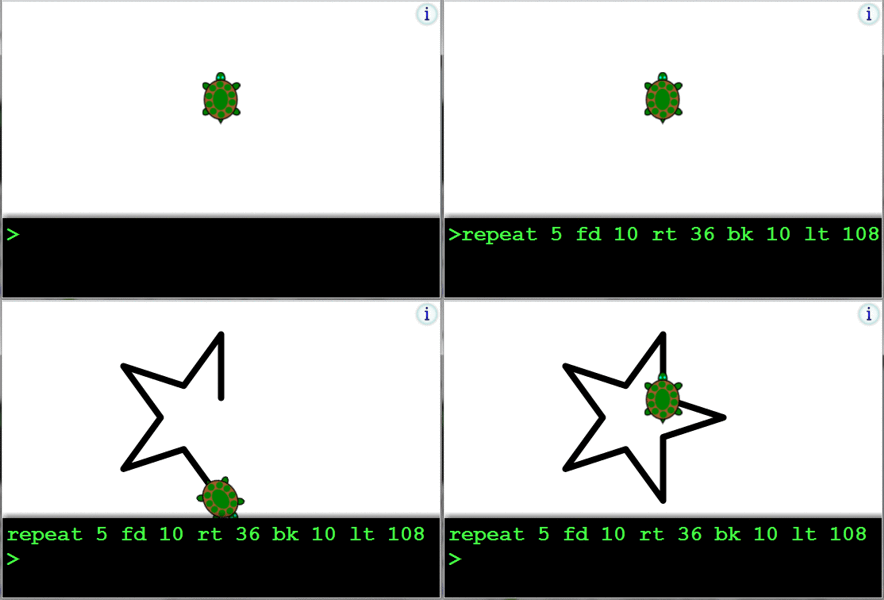
Logo is a venerable functional programming language (created 1967) which gained most of its popularity from the concept of Turtle Graphics: A small triangle on the screen (the turtle) being directed by simple commands like forward, backward, left, and right, each command followed by an argument giving the distance or turning angle.
In combination with the repeat command you could create beautiful drawings with a few commands. Being that simple, the turtle graphics of Logo is a nice way to teach the concept of programming to kids, possibly even pre-school.
The following animation shows a short demonstration of a browser-based Turtle Graphics interpreter aimed at introducing kids to computer programming. I extended the original program from John Villar by a few features. Feel free to click on it and create some nice drawings!

Click on this image to start Turtle Graphics in your browser

Another interesting aspect of turtle graphics is the agent-centric view: you need to specify movements and actions from the perspective of the turtle. For example, the effect of the forward command depends on the current heading of the turtle. This is fundamental different from most other programming languages where you draw on a canvas using absolute coordinates.
That such an agent-centric view is beneficial for modeling self-organizing systems has also been shown by the agent-based simulation language StarLogo, which is a multi-agent extension of Logo. If you are interested to use turtle graphics in education on multi-agent and decentralized systems, have a look at StarLogo.